Overview
CreatorDB supports searching YouTube, Instagram, and TikTok. When making the API call, you can specify which predefined filters you’d like to add to your search using thePOST method. Supported filters vary based on the social media platform.
API Call Flow
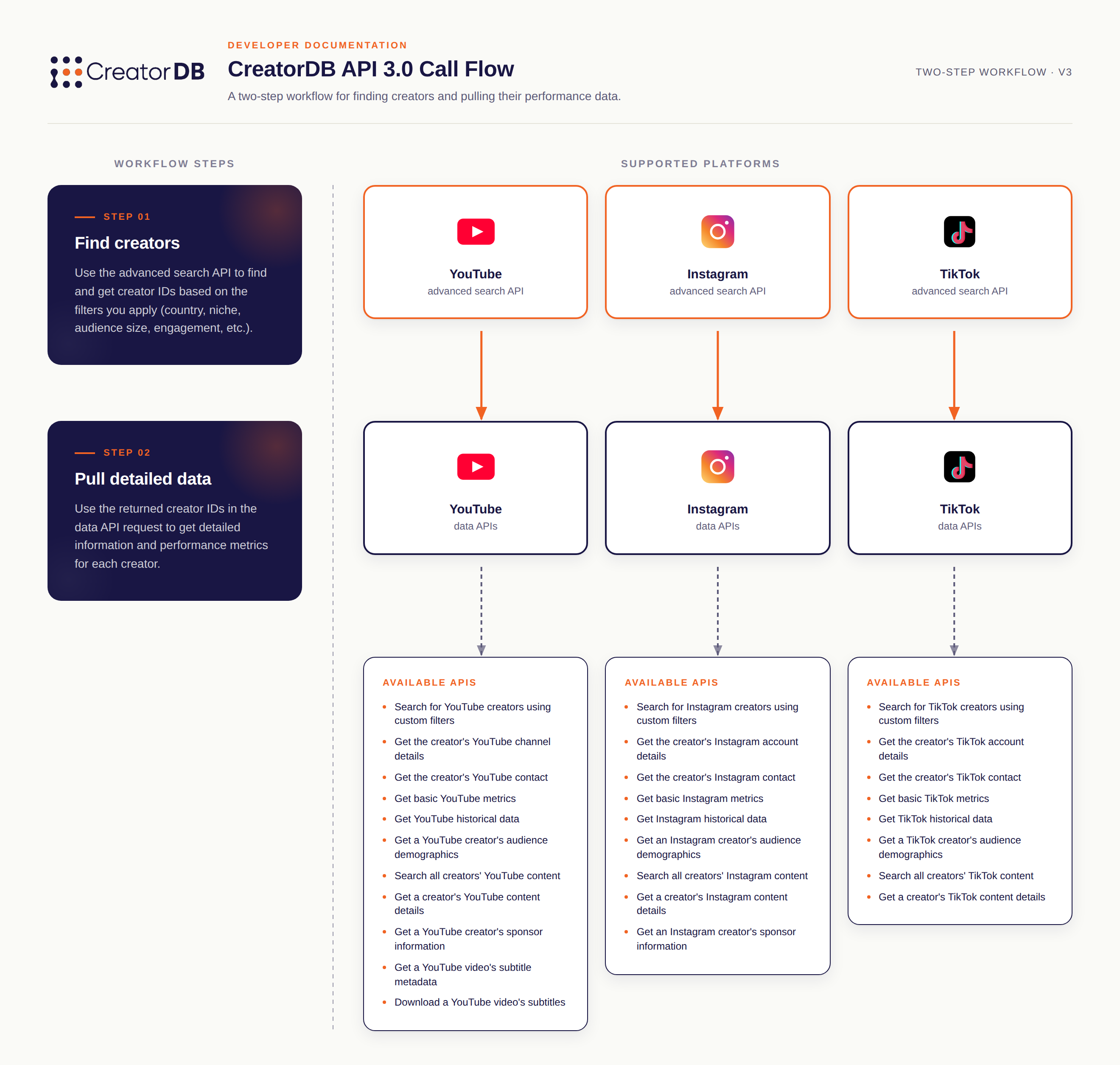
Get creator's ID.
Use the advanced search API to find and get creator IDs based on specified filter conditions. You can filter creators by country, platform metrics, YouTube audience demographics, etc. Note only YouTube audience demographics is currently available.
Get creator's detailed data and performance metrics.
Use the creator ID obtained from calling the advanced search API to make data API requests to get the creator’s detailed information and performance metrics. You can get the creator’s basic profile information, account’s historical performance data, contact information, and more.
Request Body Parameters
| Name | Required | Type | Example | Description |
|---|---|---|---|---|
offset | True | number | 0 | Specifies the number of records to skip before returning results. For example, if the offset is 5,001 and there are 10,000 search results, the returned data will skip the first 5,000 results. |
pageSize | True | number | 100 | The maximum number of records to return. The maximum number of search results returned per call is 100. After the 100 result, you must specify the offset value to get the remaining results. |
sortBy | False | string | subscribers | The field to sort results by. For example, if the value is subscribers, the creators that meet the search criteria are organized by the number of subscribers they have. |
desc | True | boolean | true | Specifies whether the data returned should be sorted in descending order. When the value is true, it will return data in descending order. Otherwise, when false the returned data will be in ascending order. |
filters | True | object[] | An array of filter objects that includes: filterKey,op, and value. | |
└─ filterName | True | string | subscribers | The field to apply the filter on. |
└─ op | True | string | = | The comparison operator. Available values include in, >, =, <. Note that all string type filter values support the operation in. |
└─ value | True | string/number/boolean/string | 10000 | The data type depends on the filterKey:-subscribers ( number)-mainLanguage ( string)-hasEmail ( boolean)For more details, see: Configuring Custom Search Filters and Examples |