

Overview
CreatorDB API 3.0 is a RESTful API that allows you to access CreatorDB’s database of creators and influencers and their public information. You can use the API to search for creators, retrieve their profiles, performance metrics, audience demographics, and more. Enrich your influencer marketing data with information CreatorDB has collected and inferred using AI models. CreatorDB maintains a database of over 30 million creators across YouTube, Instagram, and TikTok, updated almost daily. You can use our proprietary data to power a wide variety of use cases, including:- Audience demographics (age range, countries, and gender breakdown)
- Sponsored content for YouTube and Instagram
- Sponsorship cost estimates
- Topics and niches
- Creator emails
- And much more
Authentication
Every API request must be authenticated with an API key. For details on getting and using an API key, see Authentication.Rate limits
You can make up to 6,000 API calls per minute. The number of API calls you can make depends on the number of API credits you have. For details, see API Credit Usage.Key terms
The following terms are listed to help you better understand frequently used terminologies while working with CreatorDB.General terms
- Brands: A company or organization that sponsors a creator.
- Creator: An individual who creates and uploads content on social media platforms, such as YouTube, Instagram, or TikTok.
- Developer: An individual who builds apps or utilities with data fetched from CreatorDB’s database.
- App: A mobile or web application.
- Data: Public information aggregated by CreatorDB from social media platforms.
API technical terms
-
API key: The unique credential required to connect to CreatorDB’s APIs. For example,
LE6DPZQkR3TQShxofXoD2j8qCBu1-f0jti665m1t50dwDD12W - Authentication: The process of verifying an entity is who they claim to be.
- Authorization: The process of verifying an authenticated entity has permission to access data or perform requested tasks.
- Dev server: The live production environment in CreatorDB, which should only be used to connect your app to our database. This environment connects to CreatorDB’s database and contains real data. If you use this environment to make changes or for tests, it might cause issues in data quality and result in additional costs.
API versions
The CreatorDB API is currently on version 3.0. To view the API documentation for version 2.0, see CreatorDB API 2.0 documentation.API structure
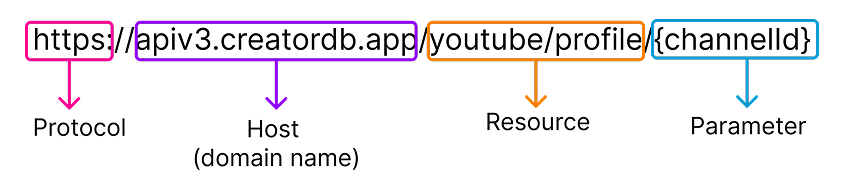
The CreatorDB API follows REST API conventions.
- Resources are nouns like
api/v3/usageoryoutube/profile. - Subresources are a classification or item of another resource.
- Actions are represented by HTTP request methods.
- Responses follow the generic JSON content type.
https://apiv3.creatordb.app/.
Methods and parameters
The CreatorDB API follows RESTful API conventions, which allow you to request and receive information from specific links (also known as URIs or endpoints). This article explains how these URIs are structured and how to use them. For details on the requirements for each URI, see the API reference.HTTP methods
The CreatorDB API accepts the standard HTTP methods: GET and POST.GET: The GET request retrieves data from the server without modifying the data.POST: The POST request sends data to the server. For example, when you make a POST request to add filters to a social media platform’s advanced search, the specified filters are in JSON format in the request body.
Request body parameters
You must include a JSON request body in POST requests. For details, see the API reference about the available request parameters for each endpoint and the required fields.Pagination
CreatorDB API uses optional parameters in the request body to paginate advanced search results. You can paginate your API requests using theoffset parameter in the request body. Note that you must paginate results and make multiple API calls when more than 100 results are returned in an API request. The CreatorDB API can only get 100 results per API call. To get records from 101 and above, use the offset parameter in the request body to paginate your results.
For example, if you get 1,000 records in an API call, you must make 10 API calls to get all the data. After retrieving 100 results in the first API call, you must set the offset parameter to 101, 201, 301, 401, 501, 601, 701, 801, and 901 to get the remaining data. Otherwise, by default, you can only get the first 100 results in every call.