

LE6DPZQkR3TQShxofXoD2j8qCBu1-f0jti665m1t50dwDD12W. The API key is the same as the api-key in the request header. Authentication requires the key in string format.
Getting an API key
API usage is billed to the account that owns the key, not the person making
the calls. If you’re using a key issued by someone else, a teammate or a
shared organization key, their account is charged for your usage.
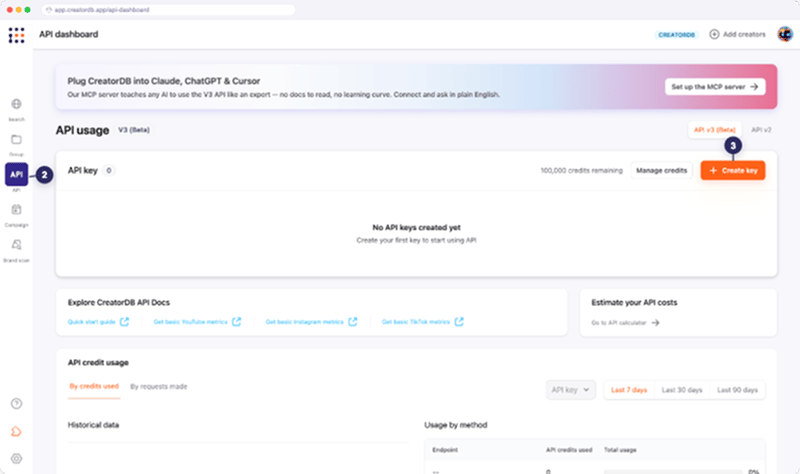
- Log in to CreatorDB.
- Click API.
- Click + Create key.
The Create API key window appears.
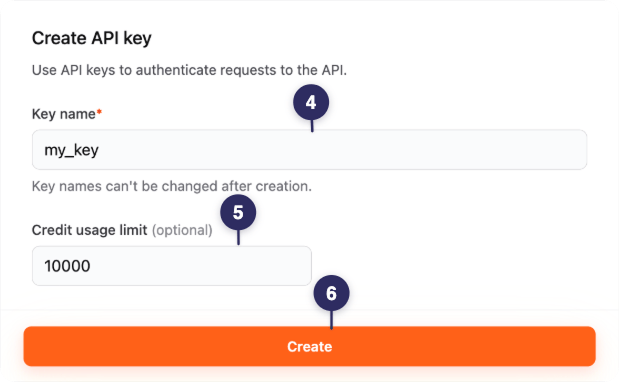
- Enter an API key name.
- Optional: Set credit usage limit.
a. Click Add credit usage limit.
b. Enter the maximum number of credits that can be used with this API key. - Click Create.
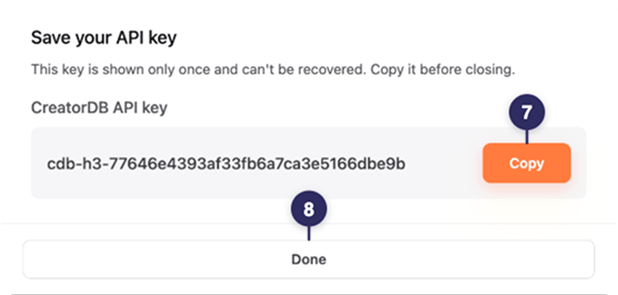
The Save your API key window appears.
- Click Copy.
The API key is now copied to your clipboard and can be used for API calls. Save the API key in a secure location, as it is required for all API requests. - Click Done.
Using an API key
Your API requests must include the API key in the authorization header. Below is an example of acURL call to CreatorDB’s API:
Secure an API key
For optimal security, follow these guidelines when managing API keys:- Restrict access to your API key. Applying restrictions helps limit unauthorized access and reduces the risk of misuse if the API keys are compromised.
- Regularly review and remove unused API keys to limit potential exposure.
- Rotate API keys periodically, remove outdated ones, and ensure all applications use the updated keys.