

Introduction
For agent-led development, CreatorDB now supports skills based on our API that can be called by AI agents like Claude. This allows you to retrieve creator or sponsoring brand data from CreatorDB in a more interactive and dynamic way, using natural language prompts. This guide walks you through how to set up and use the CreatorDB skills with Claude Code. It includes examples of how to query the CreatorDB API for specific creator information and how to build an outreach list of potential creator partners for a campaign. The diagram below shows how a natural-language prompt is routed to a skill and then to CreatorDB API endpoints.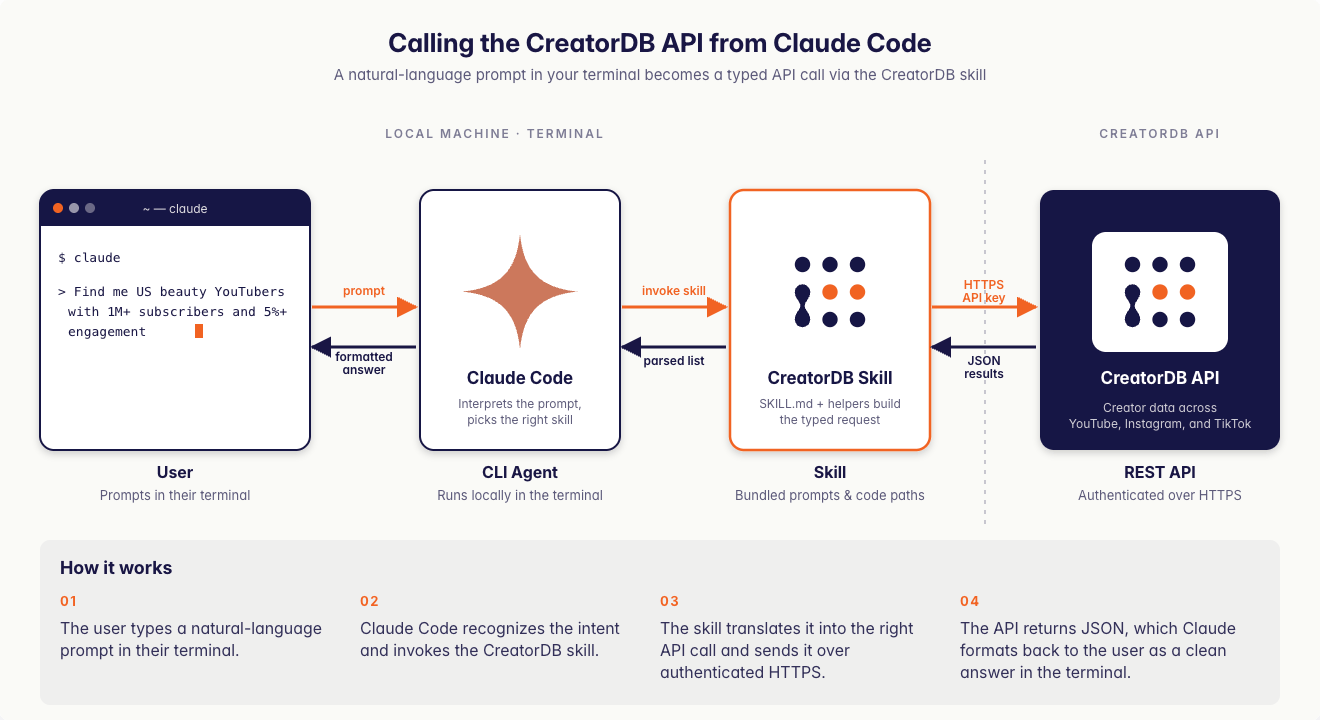
Available CreatorDB skills
Skill descriptions and supported platforms
- Subtitles are YouTube-only.
- Sponsored-content detection covers YouTube and Instagram only. There is no
/tiktok/sponsorshipendpoint, and TikTok creators are not represented in the/sponsor/*endpoints. - Topics and niches are available for all three platforms.
- The
categoryandlanguagefields are returned for YouTube content only. TikTok search responses also omit the sponsorship fields (isSponsored,partneredBrands) returned for YouTube and Instagram. - Rate-card estimates (
videoPriceandshortsPricein/youtube/performance) are YouTube-only.
Skills and primary API endpoints they call
- Supported platforms and primary endpoints are based on the current CreatorDB API version and may be updated as new features are added. Check the CreatorDB API documentation for the latest information on available endpoints and supported platforms.
System requirements
- A valid CreatorDB API key. Contact product@creatordb.app to obtain one.
- A code editor or terminal installed on your device, for example Visual Studio Code.
- Claude
- ChatGPT
- A Claude account that is Pro tier or above that supports Claude Code. For details, see Claude Pricing Plans.
- Claude Code installed and set up on your device. For details, see Claude Code Docs.
Installing CreatorDB skills
- Claude Code
- ChatGPT
To use the CreatorDB API with Claude, you need to install the CreatorDB skills onto your device. Follow these steps:
1
Launch Claude Code.
a. Open your code editor or terminal.
b. Launch Claude Code by running the command
c. Log in to your Claude account.
b. Launch Claude Code by running the command
claude. c. Log in to your Claude account.
2
Install CreatorDB skills.
Follow the instructions for your operating system to add CreatorDB skills to your Claude Code:
- macOS / Linux
- Windows (PowerShell)
Run the commands in the following instructions:
a. Create the user-level skills directory if it doesn’t exist:
b. Pull each skill from the CreatorDB document site.
c. Verify that every
Each row should show a file size of several kilobytes. If any file is 0 bytes or missing, re-run step b.
a. Create the user-level skills directory if it doesn’t exist:
SKILL.md was downloaded with a non-zero size. A 0-byte file or a missing-file error means curl was blocked or the URL changed: 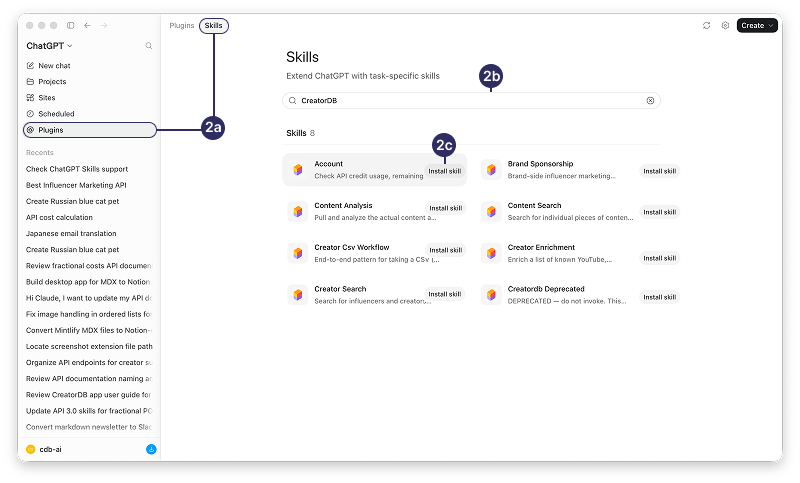
API key handling
- Claude Code
- ChatGPT
When you run a query that requires calling the CreatorDB API, Claude Code will prompt you to enter your API key if you haven’t already provided it. Here’s how to handle your API key securely:
- When your Claude Code AI agent requests access to the CreatorDB API, you should ask it to create an environment variable for your API key. Never paste your API key into the chat session, as it will be stored in the system logs and chat history.
- Claude Code will store your API key securely in its environment variables for the duration of your session, so you won’t need to enter it again for subsequent queries.
- If you need to update or change your API key, you can do so by updating the environment variable in your terminal or code editor where Claude Code is running. Run the appropriate command for your operating system to set the
YOUR_API_KEYenvironment variable to your new API key:
- macOS/Linux
- Windows PowerShell
Verifying installation of CreatorDB skills
- Claude Code
- ChatGPT
After installing CreatorDB skills, follow the instructions below to check the skills have been installed successfully.Run the following smoke-test prompts to verify CreatorDB skills are correctly installed:
a.b. End-to-end with zero credit cost: A prompt that confirms the API key flow works without spending credits. The test should route to the account skill and return your account balance snapshot.
1
Restart Claude Code.
a. Exit Claude Code by pressing (Ctrl +C).
b. Relaunch Claude to rescan the skills directory.
b. Relaunch Claude to rescan the skills directory.
2
Run smoke tests.
Responses below are illustrative reconstructions, not verbatim terminal output — exact wording, table layout, and credit numbers will vary across runs.
a.
Skill discovery: The following prompt proves Claude Code can find the skills without making an API call. Claude Code should return all CreatorDB skills with one-line descriptions.- Prompt
- Expected
- Prompt
- Expected
Troubleshooting
If you encounter any issues while using the CreatorDB API with Claude Code or ChatGPT, here are some troubleshooting steps you can take:- Check API credentials: Ensure that your API key is correctly set up in your environment variables and that you have the necessary permissions to access the endpoints you’re trying to use.
- Check for errors in the response: If you receive an error response from the API, review the error message for clues about what went wrong. Common issues include invalid parameters, rate limits, or missing data.
- Contact support: If you’re still having trouble, reach out to CreatorDB support for assistance. Provide them with details about the issue, including any error messages and the steps you’ve taken to troubleshoot.
Common errors and solutions
- Claude
- ChatGPT
SKILL.md is 0 bytes after curl.
SKILL.md is 0 bytes after curl.
Cause: This may be caused by blocked
Fix: Pull each skill from the CreatorDB document site again. If the issue persists, check your network connectivity to https://docs.creatordb.app and check the path returns content via the browser.
curl, network proxy issues, wrong URL, or the .well-known path moved.Fix: Pull each skill from the CreatorDB document site again. If the issue persists, check your network connectivity to https://docs.creatordb.app and check the path returns content via the browser.
Claude Code keeps asking for the API key every session.
Claude Code keeps asking for the API key every session.
Cause: The env var is not persisted.
Fix: Add
Fix: Add
export YOUR_API_KEY=... to ~/.zshrc or ~/.bashrc (macOS/Linux), or add to user env var (Windows).Claude Code stores the key for the current session only if not exported.
Claude routes to the wrong skill. For example, uses creator-search when the prompt is about a brand's roster.
Claude routes to the wrong skill. For example, uses creator-search when the prompt is about a brand's roster.
Cause: Your prompt phrasing matches multiple skill descriptions.
Fix: Explicitly name the skill in the prompt. For example, “use the
Fix: Explicitly name the skill in the prompt. For example, “use the
brand-sponsorship skill to…”, or rephrase to use the canonical trigger words from the skill description.Skill returns no results or empty list.
Skill returns no results or empty list.
Cause: Your filter criteria might be too narrow, the niche or category doesn’t exist in CreatorDB’s supported list, or the location filter doesn’t match.
Fix: Relax your filter criteria or try a broader search and narrow down results. You can also ask Claude Code to list available filters (“show me what’s available”) before applying.
Fix: Relax your filter criteria or try a broader search and narrow down results. You can also ask Claude Code to list available filters (“show me what’s available”) before applying.
Subtitle endpoint returned nothing for a recent video.
Subtitle endpoint returned nothing for a recent video.
Cause: CreatorDB might not have the subtitles for that video yet, since it may take a few days for the system to obtain the subtitles.
Fix: Try getting the subtitles of an older video first, or try again a few days later.
Fix: Try getting the subtitles of an older video first, or try again a few days later.
CSV save fails with permission denied.
CSV save fails with permission denied.
Cause: The working directory isn’t writable, or Claude Code lacks the file-system permission.
Fix: Run Claude Code from a writable directory, for example your Desktop or project folder. Grant Claude Code disk access in your operating system’s settings.
Fix: Run Claude Code from a writable directory, for example your Desktop or project folder. Grant Claude Code disk access in your operating system’s settings.