> ## Documentation Index
> Fetch the complete documentation index at: https://docs.creatordb.app/llms.txt
> Use this file to discover all available pages before exploring further.
# Setting Up CreatorDB Agentic Skills
> A guide on how to install CreatorDB API skills and troubleshoot common installation issues in Claude and ChatGPT.
## Introduction
For agent-led development, CreatorDB now supports skills based on our API that can be called by AI agents like Claude. This allows you to retrieve creator or sponsoring brand data from CreatorDB in a more interactive and dynamic way, using natural language prompts. In this guide, we'll walk you through how to set up and use the CreatorDB skills with Claude Code, including examples of how to query the CreatorDB API for specific creator information or to build an outreach list of potential creator partners for a campaign.
The diagram below shows how a natural-language prompt is routed to a skill and then to CreatorDB API endpoints.
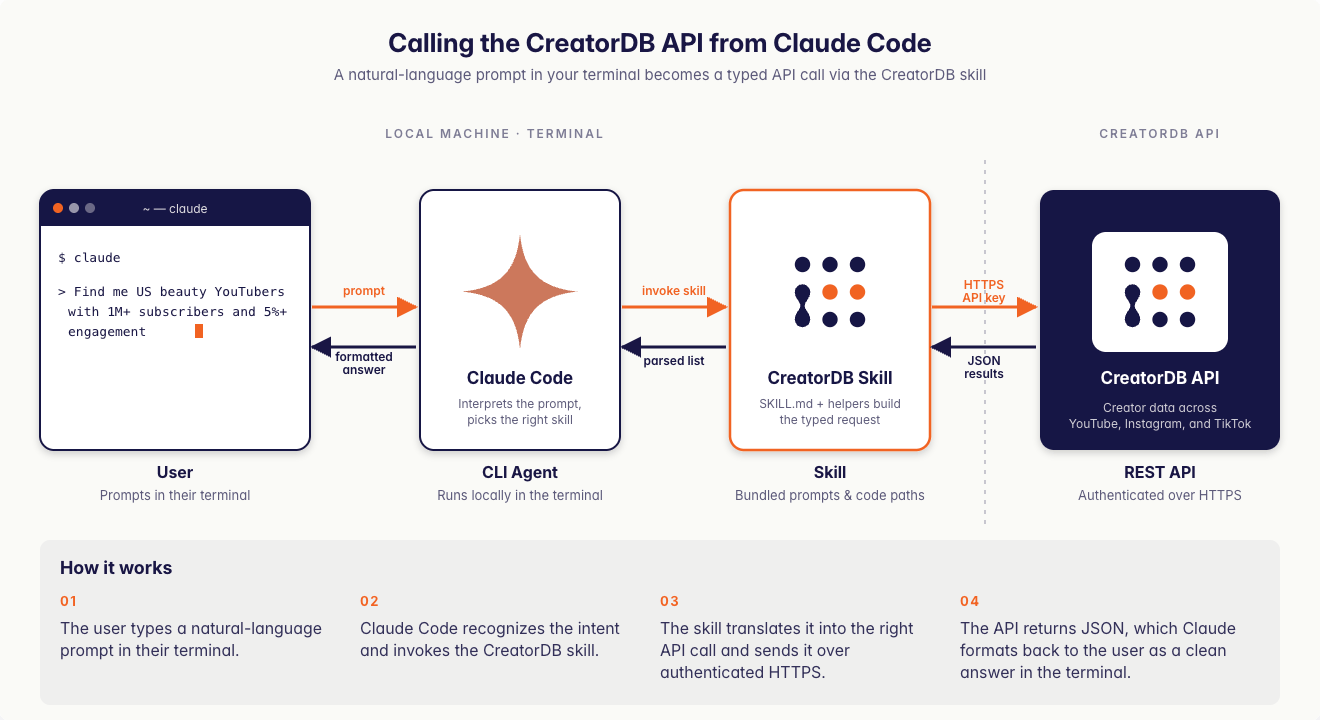 **Fig. 1: Workflow for calling CreatorDB API via CreatorDB skills.**
## Available CreatorDB skills
### Skill descriptions and supported platforms
| Name | Description | Supported platforms |
| :--------------------- | :------------------------------------------------------------------------------------------------------------------------------------------------------------------------------------------------------------------------------------------------------------------------------------------ | :------------------------- |
| `creator-search` | Find creators matching your criteria using either structured filters or a natural-language query, with optional inline enrichment in the same call. | YouTube, Instagram, TikTok |
| `creator-enrichment` | Pull deep data on creators you already have IDs, handles, or usernames for: profile and rate-card estimates, contact emails, performance metrics, performance history, audience demographics, recent content, and sponsored content. | YouTube, Instagram, TikTok |
| `content-search` | Search for individual pieces of content across all creators by performance, hashtags, sponsorship status, audio, post type, or recency. | YouTube, Instagram, TikTok |
| `content-analysis` | Retrieve and analyze the content one creator has published: recent videos, posts, reels, and shorts; past sponsored placements grouped by brand; YouTube subtitles and transcripts; and the topic and niche taxonomy CreatorDB uses to classify creators. | YouTube, Instagram, TikTok |
| `brand-sponsorship` | Brand-side intelligence across the sponsor endpoints: search and browse indexed brands, list the creators a brand has sponsored, review estimated spend, CPM, and CPE, check the audience demographics of a brand's sponsored creator pool, and submit a new brand for review and indexing. | YouTube, Instagram |
| `account` | Check API usage, remaining credits, and per-endpoint and per-platform consumption history for your API key. | CreatorDB |
| `creator-csv-workflow` | An orchestration skill that takes a CSV or flat list of creators, resolves missing identifiers, enriches each row through the other skills, and exports the results as a CSV for outreach purposes. | YouTube, Instagram, TikTok |
* Subtitles are YouTube-only.
* Sponsored-content detection covers YouTube and Instagram only. There is no `/tiktok/sponsorship` endpoint, and TikTok creators are not represented in the `/sponsor/*` endpoints.
* Topics are YouTube-only. Niches are available for all three platforms.
* The `category` and `language` fields are returned for YouTube content only. TikTok content-search responses also omit the sponsorship fields (`isSponsored`, `partneredBrands`) returned for YouTube and Instagram.
* Rate-card estimates in `/{platform}/profile` are YouTube-only.
### Skills and primary API endpoints they call
* Supported platforms and primary endpoints are based on the current CreatorDB API version and may be updated as new features are added. Check the [CreatorDB API documentation](https://docs.creatordb.app/api-reference) for the latest information on available endpoints and supported platforms.
| Name | Primary endpoints |
| :--------------------- | :-------------------------------------------------------------------------------------------------------------------------------------------------------------------------------------------------------------------- |
| `creator-search` | `/nls`, `/{platform}/search` |
| `creator-enrichment` | `/{platform}/profile`, `/{platform}/contact`, `/{platform}/performance`, `/{platform}/performance-history`, `/{platform}/audience`, `/{platform}/content-detail`, `/youtube/sponsorship`, `/instagram/sponsorship` |
| `content-search` | `/{platform}/content-search` |
| `content-analysis` | `/{platform}/content-detail`, `/youtube/sponsorship`, `/instagram/sponsorship`, `/youtube/topics`, `/{platform}/niches`, `/youtube/subtitles/meta`, `/youtube/subtitles/download` |
| `brand-sponsorship` | `/sponsor/search`, `/sponsor/list`, `/sponsor/information`, `/sponsor/creators`, `/sponsor/performance`, `/sponsor/audience`, `/sponsor/summary`, `/sponsor/submit`, `/youtube/sponsorship`, `/instagram/sponsorship` |
| `account` | `/usage` |
| `creator-csv-workflow` | Orchestrates all of the above API endpoints |
## System requirements
* A valid CreatorDB API key. Contact [sales@creatordb.app](mailto:sales@creatordb.app) to obtain one.
* A code editor or terminal installed on your device, for example Visual Studio Code.
- A Claude account that is Pro tier or above that supports Claude Code. For details, see [Claude Pricing Plans](https://claude.com/pricing).
- Claude Code installed and set up on your device. For details, see [Claude Code Docs](https://code.claude.com/docs/en/overview).
A ChatGPT account that supports personal skills. ChatGPT plan-tiers that support skills include: Business, Enterprise, Healthcare and Edu. For details, see [Skills in ChatGPT](https://help.openai.com/en/articles/20001066).
## Installing CreatorDB skills
To use the CreatorDB API with Claude, you need to install the CreatorDB skills on to your device. Follow these steps:
a. Open your code editor or terminal.
**Fig. 1: Workflow for calling CreatorDB API via CreatorDB skills.**
## Available CreatorDB skills
### Skill descriptions and supported platforms
| Name | Description | Supported platforms |
| :--------------------- | :------------------------------------------------------------------------------------------------------------------------------------------------------------------------------------------------------------------------------------------------------------------------------------------ | :------------------------- |
| `creator-search` | Find creators matching your criteria using either structured filters or a natural-language query, with optional inline enrichment in the same call. | YouTube, Instagram, TikTok |
| `creator-enrichment` | Pull deep data on creators you already have IDs, handles, or usernames for: profile and rate-card estimates, contact emails, performance metrics, performance history, audience demographics, recent content, and sponsored content. | YouTube, Instagram, TikTok |
| `content-search` | Search for individual pieces of content across all creators by performance, hashtags, sponsorship status, audio, post type, or recency. | YouTube, Instagram, TikTok |
| `content-analysis` | Retrieve and analyze the content one creator has published: recent videos, posts, reels, and shorts; past sponsored placements grouped by brand; YouTube subtitles and transcripts; and the topic and niche taxonomy CreatorDB uses to classify creators. | YouTube, Instagram, TikTok |
| `brand-sponsorship` | Brand-side intelligence across the sponsor endpoints: search and browse indexed brands, list the creators a brand has sponsored, review estimated spend, CPM, and CPE, check the audience demographics of a brand's sponsored creator pool, and submit a new brand for review and indexing. | YouTube, Instagram |
| `account` | Check API usage, remaining credits, and per-endpoint and per-platform consumption history for your API key. | CreatorDB |
| `creator-csv-workflow` | An orchestration skill that takes a CSV or flat list of creators, resolves missing identifiers, enriches each row through the other skills, and exports the results as a CSV for outreach purposes. | YouTube, Instagram, TikTok |
* Subtitles are YouTube-only.
* Sponsored-content detection covers YouTube and Instagram only. There is no `/tiktok/sponsorship` endpoint, and TikTok creators are not represented in the `/sponsor/*` endpoints.
* Topics are YouTube-only. Niches are available for all three platforms.
* The `category` and `language` fields are returned for YouTube content only. TikTok content-search responses also omit the sponsorship fields (`isSponsored`, `partneredBrands`) returned for YouTube and Instagram.
* Rate-card estimates in `/{platform}/profile` are YouTube-only.
### Skills and primary API endpoints they call
* Supported platforms and primary endpoints are based on the current CreatorDB API version and may be updated as new features are added. Check the [CreatorDB API documentation](https://docs.creatordb.app/api-reference) for the latest information on available endpoints and supported platforms.
| Name | Primary endpoints |
| :--------------------- | :-------------------------------------------------------------------------------------------------------------------------------------------------------------------------------------------------------------------- |
| `creator-search` | `/nls`, `/{platform}/search` |
| `creator-enrichment` | `/{platform}/profile`, `/{platform}/contact`, `/{platform}/performance`, `/{platform}/performance-history`, `/{platform}/audience`, `/{platform}/content-detail`, `/youtube/sponsorship`, `/instagram/sponsorship` |
| `content-search` | `/{platform}/content-search` |
| `content-analysis` | `/{platform}/content-detail`, `/youtube/sponsorship`, `/instagram/sponsorship`, `/youtube/topics`, `/{platform}/niches`, `/youtube/subtitles/meta`, `/youtube/subtitles/download` |
| `brand-sponsorship` | `/sponsor/search`, `/sponsor/list`, `/sponsor/information`, `/sponsor/creators`, `/sponsor/performance`, `/sponsor/audience`, `/sponsor/summary`, `/sponsor/submit`, `/youtube/sponsorship`, `/instagram/sponsorship` |
| `account` | `/usage` |
| `creator-csv-workflow` | Orchestrates all of the above API endpoints |
## System requirements
* A valid CreatorDB API key. Contact [sales@creatordb.app](mailto:sales@creatordb.app) to obtain one.
* A code editor or terminal installed on your device, for example Visual Studio Code.
- A Claude account that is Pro tier or above that supports Claude Code. For details, see [Claude Pricing Plans](https://claude.com/pricing).
- Claude Code installed and set up on your device. For details, see [Claude Code Docs](https://code.claude.com/docs/en/overview).
A ChatGPT account that supports personal skills. ChatGPT plan-tiers that support skills include: Business, Enterprise, Healthcare and Edu. For details, see [Skills in ChatGPT](https://help.openai.com/en/articles/20001066).
## Installing CreatorDB skills
To use the CreatorDB API with Claude, you need to install the CreatorDB skills on to your device. Follow these steps:
a. Open your code editor or terminal.
b. Launch Claude Code by running the command `claude`.
c. Log in to your Claude account.
Follow the instructions for your operating system to add CreatorDB skills to your Claude Code:
Run the commands in the following instructions:
a. Create the user-level skills directory if it doesn't exist:
```bash theme={null}
mkdir -p ~/.claude/skills
```
b. Pull each skill from the CreatorDB document site.
```bash theme={null}
for skill in creator-search creator-enrichment content-search brand-sponsorship content-analysis account creator-csv-workflow; do
mkdir -p ~/.claude/skills/$skill
curl -s "https://docs.creatordb.app/.well-known/agent-skills/$skill/SKILL.md" \
-o ~/.claude/skills/$skill/SKILL.md
done
```
c. Verify that every `SKILL.md` was downloaded with a non-zero size — a 0-byte file or a missing-file error means `curl` was blocked or the URL changed:
```bash theme={null}
ls -la ~/.claude/skills/*/SKILL.md
```
Each row should show a file size of several kilobytes. If any file is 0 bytes or missing, re-run step b.
Run the commands in the following instructions:
a. Create the user-level skills directory if it doesn't exist:
```powershell theme={null}
New-Item -ItemType Directory -Force -Path "$HOME\.claude\skills" | Out-Null
```
b. Pull each skill from the CreatorDB document site.
```powershell theme={null}
$skills = @(
"creator-search", "creator-enrichment", "content-search",
"brand-sponsorship", "content-analysis", "account",
"creator-csv-workflow"
)
foreach ($skill in $skills) {
$dir = "$HOME\.claude\skills\$skill"
New-Item -ItemType Directory -Force -Path $dir | Out-Null
Invoke-WebRequest `
-Uri "https://docs.creatordb.app/.well-known/agent-skills/$skill/SKILL.md" `
-OutFile "$dir\SKILL.md"
}
```
c. Verify that every `SKILL.md` was downloaded with a non-zero size:
```powershell theme={null}
Get-ChildItem "$HOME\.claude\skills\*\SKILL.md" |
Select-Object @{n="Skill";e={$_.Directory.Name}}, Length
```
Each row should show a `Length` of several thousand bytes. If a row is missing or `Length` is 0, re-run step b.
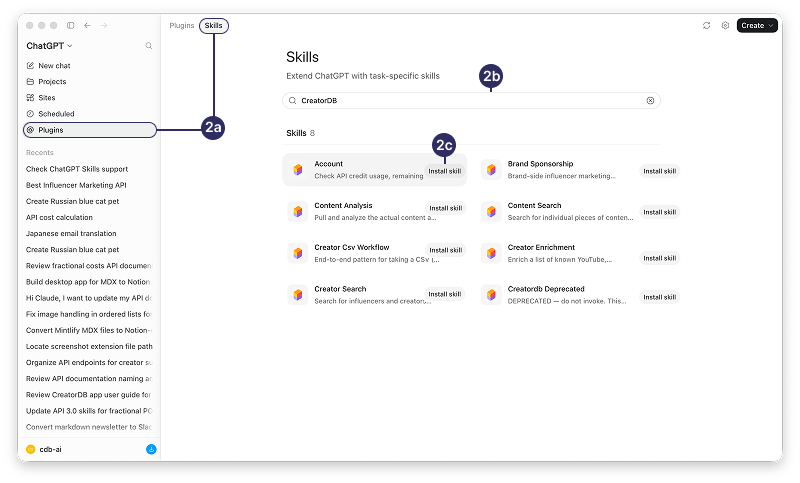
To use the CreatorDB API with ChatGPT, you need to install the CreatorDB skills on to your device. Follow these steps:
a. Open ChatGPT on your web browser or through the desktop app.
b. Log in to your ChatGPT account.
a. Click **Plugins -> Skills**.
b. Search for CreatorDB.
CreatorDB related skills will be displayed.
c. Click **Install skill**.
The selected CreatorDB skill will be installed.
 ## API key handling
Always keep your API key confidential and do not share it publicly or hard-code it in any scripts that may be shared. If you believe your API key has been compromised, contact CreatorDB support at [support@creatordb.app](mailto:support@creatordb.app) immediately to have it revoked and a new one issued.
When you run a query that requires calling the CreatorDB API, Claude Code will prompt you to enter your API key if you haven't already provided it. Here's how to handle your API key securely:
1. When your Claude Code AI agent requests access to the CreatorDB API, you should ask it to create an environment variable for your API key. Never paste your API key into the chat session, as it will be stored in the system logs and chat history.
2. Claude Code will store your API key securely in its environment variables for the duration of your session, so you won't need to enter it again for subsequent queries.
3. If you need to update or change your API key, you can do so by updating the environment variable in your terminal or code editor where Claude Code is running. Run the appropriate command for your operating system to set the `YOUR_API_KEY` environment variable to your new API key:
```bash theme={null}
export YOUR_API_KEY=your_new_api_key
```
```powershell theme={null}
$env: YOUR_API_KEY="your_new_api_key"
```
When you run a query that requires calling the CreatorDB API, ChatGPT will prompt you to enter your API key if you haven't already provided it. Here's how to handle your API key securely:
1. When prompted, enter your CreatorDB API key. This key is used to authenticate your requests to the CreatorDB API.
2. The API key is connected to ChatGPT via OAuth and stored in Open-AI managed credential infrastructure using audited key-management practices. The API-keys are not stored as plain text or ordinary environment variables. For details, see [OpenAI security documentation](https://help.openai.com/en/articles/11509118-admin-controls-security-and-compliance-in-connectors-enterprise-edu-and-team).
3. If your ChatGPT is connected to the CreatorDB MCP server, the API key might be stored in the MCP server-side environment or secret manager. ChatGPT calls the server without ever possessing the raw key. For details, see [Setting up the CreatorDB MCP server](https://docs.creatordb.app/mcp-server/setting-up-creatordb-mcp-server).
## Verify installation of CreatorDB skills
After installing CreatorDB skills, follow the instructions below to check the skills have been installed successfully.
a. Exit Claude Code by pressing (Ctrl +C).
## API key handling
Always keep your API key confidential and do not share it publicly or hard-code it in any scripts that may be shared. If you believe your API key has been compromised, contact CreatorDB support at [support@creatordb.app](mailto:support@creatordb.app) immediately to have it revoked and a new one issued.
When you run a query that requires calling the CreatorDB API, Claude Code will prompt you to enter your API key if you haven't already provided it. Here's how to handle your API key securely:
1. When your Claude Code AI agent requests access to the CreatorDB API, you should ask it to create an environment variable for your API key. Never paste your API key into the chat session, as it will be stored in the system logs and chat history.
2. Claude Code will store your API key securely in its environment variables for the duration of your session, so you won't need to enter it again for subsequent queries.
3. If you need to update or change your API key, you can do so by updating the environment variable in your terminal or code editor where Claude Code is running. Run the appropriate command for your operating system to set the `YOUR_API_KEY` environment variable to your new API key:
```bash theme={null}
export YOUR_API_KEY=your_new_api_key
```
```powershell theme={null}
$env: YOUR_API_KEY="your_new_api_key"
```
When you run a query that requires calling the CreatorDB API, ChatGPT will prompt you to enter your API key if you haven't already provided it. Here's how to handle your API key securely:
1. When prompted, enter your CreatorDB API key. This key is used to authenticate your requests to the CreatorDB API.
2. The API key is connected to ChatGPT via OAuth and stored in Open-AI managed credential infrastructure using audited key-management practices. The API-keys are not stored as plain text or ordinary environment variables. For details, see [OpenAI security documentation](https://help.openai.com/en/articles/11509118-admin-controls-security-and-compliance-in-connectors-enterprise-edu-and-team).
3. If your ChatGPT is connected to the CreatorDB MCP server, the API key might be stored in the MCP server-side environment or secret manager. ChatGPT calls the server without ever possessing the raw key. For details, see [Setting up the CreatorDB MCP server](https://docs.creatordb.app/mcp-server/setting-up-creatordb-mcp-server).
## Verify installation of CreatorDB skills
After installing CreatorDB skills, follow the instructions below to check the skills have been installed successfully.
a. Exit Claude Code by pressing (Ctrl +C).
b. Relaunch Claude to rescan the skills directory.
Responses below are illustrative reconstructions, not verbatim terminal output — exact wording, table layout, and credit numbers will vary across runs.
Run the following smoke-test prompts to verify CreatorDB skills are correctly installed:
a. `Skill discovery`: The following prompt proves Claude Code can find the skills without making an API call. Claude Code should return all CreatorDB skills with one-line descriptions.
```text theme={null}
What CreatorDB skills do you have available?
```
```text theme={null}
I have seven CreatorDB skills available:
- `creator-search` — Find creators across YouTube, Instagram, and TikTok by criteria like follower count, engagement rate, country, language, niche, growth rate, or sponsorship history, plus natural-language queries.
- `creator-enrichment` — Enrich a known creator (channel ID, handle, or username) with profile data, contact emails, audience demographics, performance metrics, performance history, recent content, and rate-card estimates.
- `content-search` — Find individual pieces of content across all creators by performance, hashtags, sponsorship status, audio, post type, or recency.
- `content-analysis` — Pull and analyze one creator's published content: recent videos/posts/shorts, sponsored placements and which brands they're for, subtitles/transcripts, and CreatorDB's topic and niche taxonomy.
- `brand-sponsorship` — Brand-side intelligence: which creators a brand sponsors, which brands sponsor a vertical, estimated total spend / CPM / CPE, sponsored-content benchmarks, audience demographics of a brand's creator pool, and submitting a new brand for review and indexing.
- `account` — Check API credit usage, remaining quota, and per-endpoint consumption history for your CreatorDB API key.
- `creator-csv-workflow` — Orchestration skill: take a CSV or list of creators, enrich it via the other skills, and export an enriched CSV.
```
This test passes whether the API key is wired up.
b. End-to-end with zero credit cost: A prompt that confirms the API key flow works without spending credits. The test should route to the account skill and return your account balance snapshot.
```text theme={null}
Check my CreatorDB account balance
```
**Balance**
* Credits remaining: 987,654.59
* This `/usage` call cost 0 credits
**Activity (recent days)**
| Date | Requests | Credits |
| ---------- | -------: | -------: |
| 2026-04-28 | 270 | 2,465 |
| 2026-04-29 | 753 | 5,177 |
| 2026-04-30 | 326 | 2,074 |
| 2026-05-04 | 420 | 2,268.41 |
| 2026-05-05 | 1 | 0 |
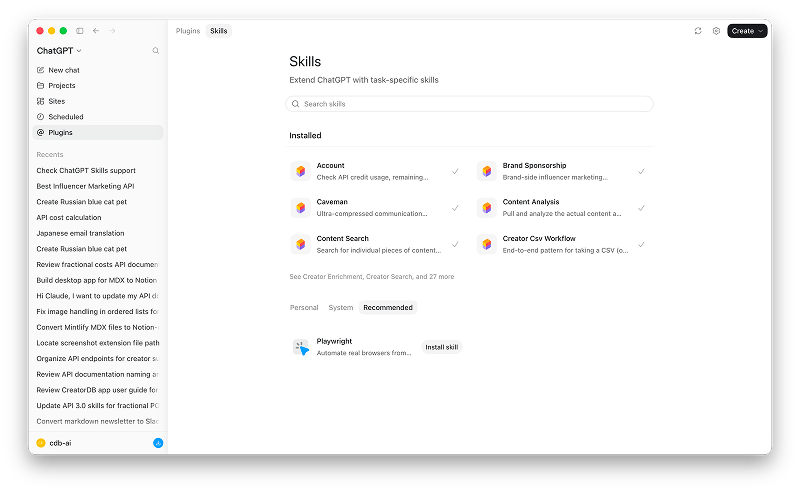
a. Open ChatGPT on your web browser or through the desktop app.
b. Log in to your ChatGPT account.
Go to **Plugins -> Skills**.
Check the **Installed** section to see if the CreatorDB skills are listed. Successfully installed skills will have a checkmark next to them.
 ## Troubleshooting
If you encounter any issues while using the CreatorDB API with Claude Code or ChatGPT, here are some troubleshooting steps you can take:
1. **Check API credentials**: Ensure that your API key is correctly set up in your environment variables and that you have the necessary permissions to access the endpoints you're trying to use.
2. **Check for errors in the response**: If you receive an error response from the API, review the error message for clues about what went wrong. Common issues include invalid parameters, rate limits, or missing data.
3. **Contact support**: If you're still having trouble, reach out to CreatorDB support for assistance. Provide them with details about the issue, including any error messages and the steps you've taken to troubleshoot.
#### Common errors and solutions
**Cause:** This may be caused by blocked `curl`, network proxy issues, wrong URL, or the `.well-known` path moved.
## Troubleshooting
If you encounter any issues while using the CreatorDB API with Claude Code or ChatGPT, here are some troubleshooting steps you can take:
1. **Check API credentials**: Ensure that your API key is correctly set up in your environment variables and that you have the necessary permissions to access the endpoints you're trying to use.
2. **Check for errors in the response**: If you receive an error response from the API, review the error message for clues about what went wrong. Common issues include invalid parameters, rate limits, or missing data.
3. **Contact support**: If you're still having trouble, reach out to CreatorDB support for assistance. Provide them with details about the issue, including any error messages and the steps you've taken to troubleshoot.
#### Common errors and solutions
**Cause:** This may be caused by blocked `curl`, network proxy issues, wrong URL, or the `.well-known` path moved.
**Fix:** Pull each skill from the CreatorDB document site again. If the issue persists, check your network connectivity to the [https://docs.creatordb.app](https://docs.creatordb.app) and check the path returns content via the browser.
**Cause:** An invalid key response may be caused by typos, wrong API key, or the key was revoked.
**Fix:** You can contact [sales@creatordb.app](mailto:sales@creatordb.app) to verify the key is still active. Also try reconfiguring the env var `(export YOUR_API_KEY=...)`.
**Cause:** The env var is not persisted.
**Fix:** Add `export YOUR_API_KEY=...` to `~/.zshrc` or `~/.bashrc` (macOS/Linux), or add to user env var (Windows).
Claude Code stores the key for the current session only if not exported.
**Cause:** Your prompt phrasing matches multiple skills descriptions.
**Fix:** Explicitly name the skill in the prompt. For example, "use the `brand-sponsorship` skill to...", or rephrase to use the canonical trigger words from the skill description.
**Cause:** Your filter criteria might be too narrow, the niche or category doesn't exist in CreatorDB's supported list, or the location filter doesn't match.
**Fix:** Relax your filter criteria or try a broader search and narrow down results. You can also ask Claude Code to list available filters ("show me what's available") before applying.
**Cause:** CreatorDB might not have the subtitles for that video yet, since it may take a few days for the system to obtain the subtitles.
**Fix:** Try getting the subtitles of an older video first, or try again a few days later.
**Cause:** The working directory isn't writable, or Claude Code lacks the file-system permission.
**Fix:** Run Claude Code from a writable directory, for example your Desktop or project folder. Grant Claude Code disk access to your operating system's settings.
**Cause:** The skill feature is not available for your ChatGPT plan tier or your admin has not enabled it.
**Fix:** Ensure you are on a plan that supports skills (Business, Enterprise, Healthcare, or Edu). For Enterprise and Edu plan users, please make sure your admin has enabled skills and granted you permission. You can also try reinstalling the CreatorDB skills. For details, see [Skills in ChatGPT](https://help.openai.com/en/articles/20001066).
**Cause:** The skill installation may have failed or the skill is not available for your ChatGPT plan tier.
**Fix:** Ensure you are on a plan that supports skills (Business, Enterprise, Healthcare, or Edu). Try reinstalling the CreatorDB skills.
**Cause:** An invalid key response may be caused by typos, wrong API key, or the key was revoked.
**Fix:** You can contact [sales@creatordb.app](mailto:sales@creatordb.app) to verify the key is still active.
**Cause:** The skill can't be uninstalled because of the installation method.
**Fix:** Check for the following:
* If the skill is bundled inside a plugin. Uninstall the plugin to remove the skill.
* If an admin installed the skill. You need to contact the admin for assistance and change the installation policy from **Installed** to **Available** or remove access.
* The skill is shared with the workplace. You need to be an owner or workspace admin to remove the skill. Contact your workspace admin for assistance.
* Different ChatGPT interface. Personal Skills are managed separately on desktop, web, or mobile and changes don't automatically sync.