> ## Documentation Index
> Fetch the complete documentation index at: https://docs.creatordb.app/llms.txt
> Use this file to discover all available pages before exploring further.
# API Pricing Plan
> One credit pool across CreatorDB App and the API
All paid plans include the entire product suite, including the CreatorDB App and the API 3.0. API access is gated by **credit balance, not feature**. Each plan has a different credit rate in US dollars (USD) and you can always purchase additional credits if you run out. The **Free** plan is limited to minimal search and public profiles. There is **no free trial** for the API, but you can purchase a minimum of US\$20 worth of credits (500 credits) on the **Free** plan to test the API before committing to a paid plan. You can make up to 6,000 API call requests per minute.
## How credits work
The CreatorDB App and API 3.0 share the same credit pool. Credits included in the subscribed plan are issued **monthly** and do not roll over. They are **not paid as a lump sum**. Meanwhile, purchased credits only last one year from the date of purchase, and each purchase carries its own clock, including discounted credits purchased on an annual plan.
For example, if you purchase 1,000 credits on January 1, 2024, they will expire on January 1, 2025. If you purchase another 1,000 credits on June 1, 2024, those credits will expire on June 1, 2025.
Plan credits are used first before the earliest purchased credits.
For example, if you buy 10,000 extra credits on August 12 and then buy 50,000 on September 11, the credits purchased in August will be used first before the September credits. If you use 15,000 credits in September, the August credits will be used up first, and you will have 45,000 September credits remaining.
When your plan runs out of credits, you will get a `402 PAYMENT REQUIRED` error when making an API call. You can purchase additional credits to continue using the API or upgrade to a higher-tier paid plan to get more credits.
## Plans and credit rates
Save **20% to 25%** by paying annually. Annual plans are billed upfront. You can upgrade or downgrade your plan at any time. Upgrading a plan will take effect immediately, and you will be charged the difference in price for the remainder of the month. Downgrading a plan will take effect in the next billing cycle.
| Plan | Monthly | Annual | Effective per month | Credits per month | \$ / credit (monthly) | \$ / credit (annual) | Note |
| -------------- | ------------------ | ------- | ------------------- | ----------------- | ----------------------------- | -------------------- | ------------------------------------ |
| **Free** | \$0 | N/A | \$0 | 0 | \$0.040 (buy as you go) | N/A | Minimum top-up \$20 buys 500 credits |
| **Tier 1** | \$79 | \$708 | \$59 | 2,000 | \$0.0395 | \$0.0295 | |
| **Tier 2** | \$249 | \$2,388 | \$199 | 10,000 | \$0.0249 | \$0.0199 | |
| **Tier 3** | \$749 | \$7,188 | \$599 | 100,000 | \$0.00749 | \$0.00599 | |
| **Enterprise** | \$10,000 (minimum) | N/A | Custom | Custom | Custom, below the Tier 3 rate | N/A | |
Prices in USD and subject to change. For current pricing, see [CreatorDB Pricing](https://creatordb.app/pricing/).
You can estimate your API consumption costs by using the **API Calculator** tool in the CreatorDB App. The calculator lets you select the endpoints you want to call, the number of calls, and the fields you want to request. It will then calculate the estimated API call cost based on your plan and usage. You can also enter a prompt describing the data you want to pull to get an estimate of the number of API calls and credits required.
## Buying additional credits
If you use up all plan credits and need more, you can purchase extra credits at the discounted rates through the **API dashboard** in the CreatorDB App.
For example, if you are on the **Tier 1 plan** and purchase 1,000 extra credits, you will have a total of 3,000 credits available this month. These comprise your 2,000 plan credits, which expire at the end of the month, and the 1,000 purchased credits, which remain available for a year.
If you are on the **Tier 2 plan** and purchase 5,000 extra credits, you will have a total of 15,000 credits available this month: 10,000 plan credits that expire at the end of the month, and 5,000 purchased credits that remain available for a year.
Follow the steps below to purchase additional credits:
1. Log in to CreatorDB.
2. Click **API**.
3. Click **Manage credits**.
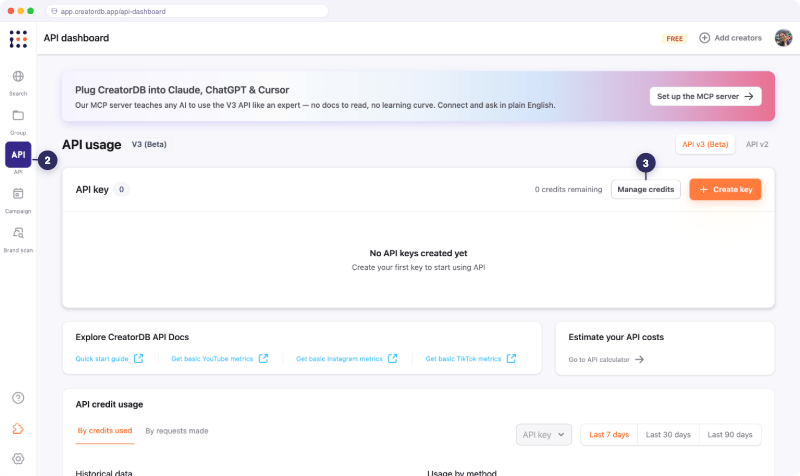 4. Click **Buy more**.
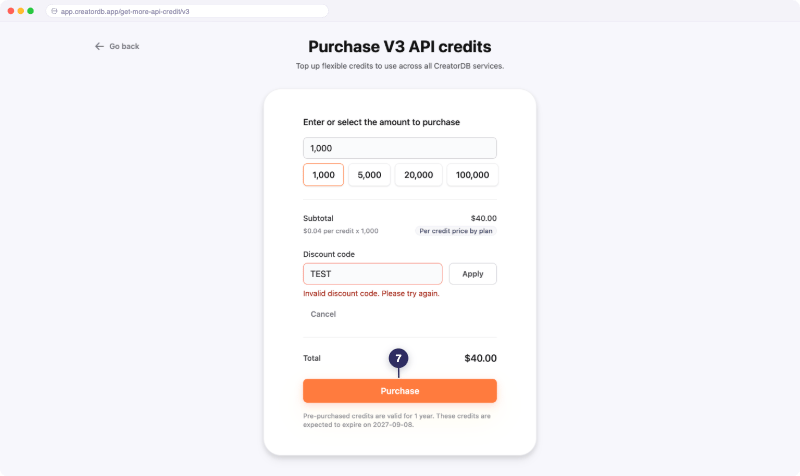
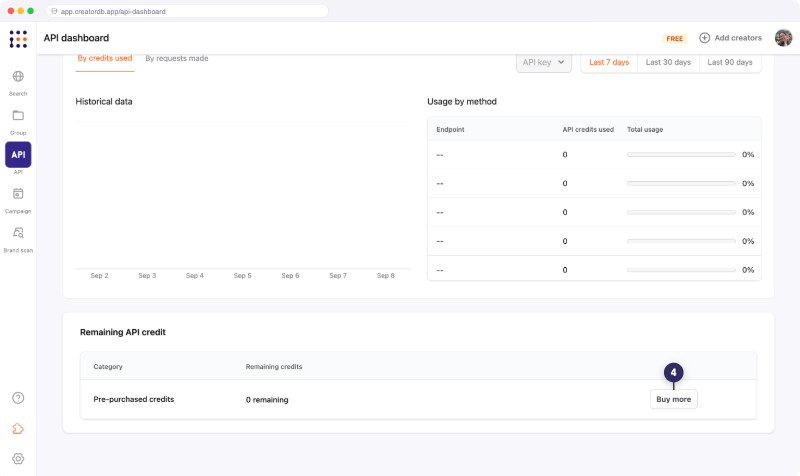 5. Select or enter the number of credits you want to purchase.
6. **Optional:** Enter a discount code.
5. Select or enter the number of credits you want to purchase.
6. **Optional:** Enter a discount code.
a. Click **Discount code**.
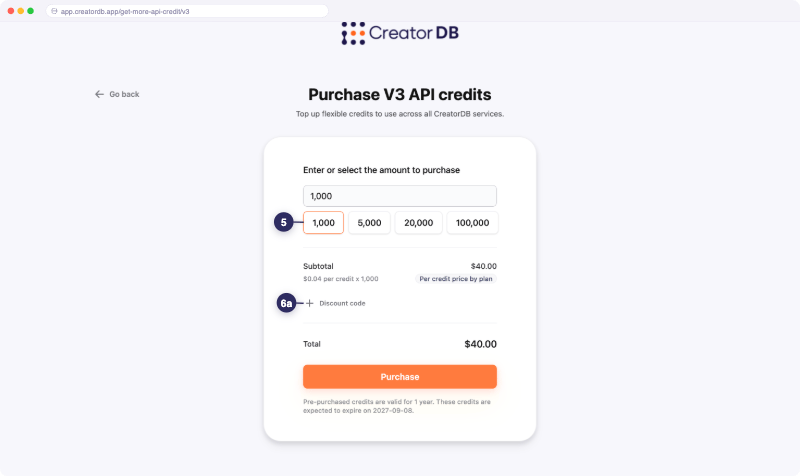 b. Enter the code.
c. Click **Apply**.
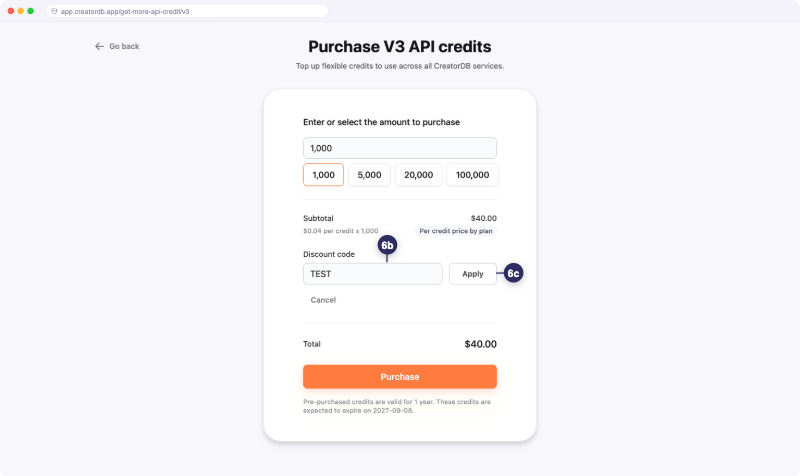 7. Click **Purchase**.
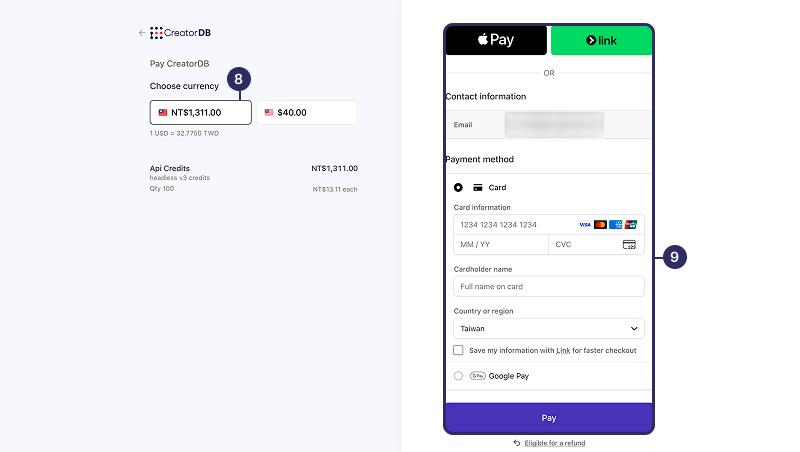
You will be redirected to the payment page.
 8. Select a currency.
9. Select a payment method and follow the on-screen instructions to complete the purchase.
8. Select a currency.
9. Select a payment method and follow the on-screen instructions to complete the purchase.
You will receive a confirmation email once the purchase is successful.
 ## What a credit buys you
The following table shows the per-call costs from the [API Credit Usage](/api-v3/api-credit-usage) page, priced at the **Tier 1**, **Tier 2**, and **Tier 3** monthly rates.
| API call | Credits | Tier 1 (\$0.0395) | Tier 2 (\$0.0249) | Tier 3 (\$0.00749) | Fractional |
| --------------------------- | ------------------------------- | ----------------- | ----------------- | ------------------ | ------------------------------------------------------------------ |
| Natural language search | Dynamic (token-based) | Varies | Varies | Varies | Not supported. Billed by token usage |
| Search (structured filters) | 1 per 10 filters | \$0.0395 | \$0.0249 | \$0.00749 | Enrichment billed per result |
| Creator profile | 2 | \$0.079 | \$0.0498 | \$0.01498 | From 0.1 per field |
| Performance | 2 (TikTok 1.5) | \$0.079 | \$0.0498 | \$0.01498 | From 0.2 per block |
| Performance history | 3–5 by time range | $0.1185–$0.1975 | $0.0747–$0.1245 | $0.02247–$0.03745 | Not supported. Priced by `pastDayRange` |
| Content search | 50–100 (Instagram 10, TikTok 2) | $1.975–$3.95 | $1.245–$2.49 | $0.3745–$0.749 | Not supported. 100 credits when a `description` filter is included |
| Content detail | 3 | \$0.1185 | \$0.0747 | \$0.02247 | 0.1 per video or post |
| Sponsorship | 5 | \$0.1975 | \$0.1245 | \$0.03745 | 0.5 per brand |
| Audience demographics | 10 | \$0.395 | \$0.249 | \$0.0749 | From 0.1 per field |
| Contact email | 15 | \$0.5925 | \$0.3735 | \$0.11235 | Single field, billed at the full bundle |
Dollar figures are exact at the listed plan rates. Content search figures show the YouTube range; Instagram and TikTok content search cost 10 and 2 credits respectively.
Fractional calls are available for some endpoints, allowing you to request only the data you need and pay proportionally, capped at the full-bundle price. You are never charged more than the full-bundle price. You need to enable fractional calls on your API key to use this feature. If fractional calls aren't enabled, requests that include `fields` return a `403` (`FRACTIONAL_CALLS_NOT_ENABLED3` (`FRACTIONAL_CALLS_NOT_ENABLED`) error. Full-bundle calls always work. Contact your account manager to enable fractional calls.
## Related topics
* [API Credit Usage](/api-v3/api-credit-usage): Lists details about API credit usage per endpoint.
* [Fractional Calls](/api-v3/fractional-calls): Explains how to use fractional calls to reduce API credit usage.
* [Field and Item Costs](/api-v3/field-and-item-costs): Lists the cost of each field and item for fractional calls.
* [Error Codes](/api-v3/error-code): Lists the error codes returned by the API and their meanings.
## What a credit buys you
The following table shows the per-call costs from the [API Credit Usage](/api-v3/api-credit-usage) page, priced at the **Tier 1**, **Tier 2**, and **Tier 3** monthly rates.
| API call | Credits | Tier 1 (\$0.0395) | Tier 2 (\$0.0249) | Tier 3 (\$0.00749) | Fractional |
| --------------------------- | ------------------------------- | ----------------- | ----------------- | ------------------ | ------------------------------------------------------------------ |
| Natural language search | Dynamic (token-based) | Varies | Varies | Varies | Not supported. Billed by token usage |
| Search (structured filters) | 1 per 10 filters | \$0.0395 | \$0.0249 | \$0.00749 | Enrichment billed per result |
| Creator profile | 2 | \$0.079 | \$0.0498 | \$0.01498 | From 0.1 per field |
| Performance | 2 (TikTok 1.5) | \$0.079 | \$0.0498 | \$0.01498 | From 0.2 per block |
| Performance history | 3–5 by time range | $0.1185–$0.1975 | $0.0747–$0.1245 | $0.02247–$0.03745 | Not supported. Priced by `pastDayRange` |
| Content search | 50–100 (Instagram 10, TikTok 2) | $1.975–$3.95 | $1.245–$2.49 | $0.3745–$0.749 | Not supported. 100 credits when a `description` filter is included |
| Content detail | 3 | \$0.1185 | \$0.0747 | \$0.02247 | 0.1 per video or post |
| Sponsorship | 5 | \$0.1975 | \$0.1245 | \$0.03745 | 0.5 per brand |
| Audience demographics | 10 | \$0.395 | \$0.249 | \$0.0749 | From 0.1 per field |
| Contact email | 15 | \$0.5925 | \$0.3735 | \$0.11235 | Single field, billed at the full bundle |
Dollar figures are exact at the listed plan rates. Content search figures show the YouTube range; Instagram and TikTok content search cost 10 and 2 credits respectively.
Fractional calls are available for some endpoints, allowing you to request only the data you need and pay proportionally, capped at the full-bundle price. You are never charged more than the full-bundle price. You need to enable fractional calls on your API key to use this feature. If fractional calls aren't enabled, requests that include `fields` return a `403` (`FRACTIONAL_CALLS_NOT_ENABLED3` (`FRACTIONAL_CALLS_NOT_ENABLED`) error. Full-bundle calls always work. Contact your account manager to enable fractional calls.
## Related topics
* [API Credit Usage](/api-v3/api-credit-usage): Lists details about API credit usage per endpoint.
* [Fractional Calls](/api-v3/fractional-calls): Explains how to use fractional calls to reduce API credit usage.
* [Field and Item Costs](/api-v3/field-and-item-costs): Lists the cost of each field and item for fractional calls.
* [Error Codes](/api-v3/error-code): Lists the error codes returned by the API and their meanings.